Title: miPlata FACTURAR
Author: miplata
Published: அக்டோபர் 22, 2026
Last modified: அக்டோபர் 22, 2026
---
நீட்சிகளை தேடுங்கள்

# miPlata FACTURAR
By [miplata](https://profiles.wordpress.org/miplata/)
[பதிவிறக்கு](https://downloads.wordpress.org/plugin/miplata.1.0.3.zip)
* [Details](https://ta.wordpress.org/plugins/miplata/#description)
* [Reviews](https://ta.wordpress.org/plugins/miplata/#reviews)
* [Installation](https://ta.wordpress.org/plugins/miplata/#installation)
* [Development](https://ta.wordpress.org/plugins/miplata/#developers)
[உதவி](https://wordpress.org/support/plugin/miplata/)
## விளக்கம்
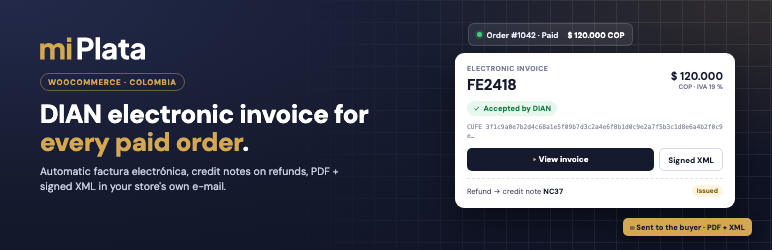
**miPlata FACTURAR** connects your WooCommerce store to your electronic-invoicing
account at [miPlata](https://miplata.co) and issues a DIAN-validated electronic
invoice (_factura electrónica_, Colombia) for every paid order — no manual steps.
* **Invoice on payment.** When an order moves to _Processing_ or _Completed_, the
plugin registers it with miPlata using native WooCommerce data (lines, coupons,
shipping, fees, taxes, buyer). miPlata builds and signs the UBL 2.1 invoice and
the DIAN validates it.
* **WAVA payments verified.** If you take payments with the official WAVA plugin(
Nequi, cards, PSE), the invoice is only issued once WAVA confirms the payment
to miPlata: an unpaid order is never invoiced.
* **PayPal in foreign currency.** Orders in USD, EUR, GBP, CAD, CHF, MXN or JPY
are invoiced in their currency with the day’s official exchange rate (TRM).
* **Your store’s e-mail.** The invoice (PDF + signed XML) is attached to your own
WooCommerce e-mail, with your template and logo. The buyer can also open it with
one click in _My account View invoice_ and on the order-received page.
* **Refunds become credit notes.** A full or partial refund issues the matching
DIAN credit note (_nota crédito_).
* **Only one new field.** Buyer ID type and number — and only if no other plugin
already asks for them. Optionally, the city as a DANE department municipality
dropdown.
* **Optional miPlata gateways.** “Pay with WAVA” and “Pay with PayPal (miPlata)”
for merchants who prefer not to install another payment plugin.
* **HPOS and Cart/Checkout blocks** compatible.
The plugin’s admin screens and buyer-facing texts are in Spanish (Colombia), the
language of its users.
#### Requirements
* A miPlata account with electronic invoicing enabled (DIAN test or production).
Sign up at [miplata.co](https://miplata.co).
* WooCommerce 7.9 or later, PHP 7.4 or later. The PHP sodium extension is recommended(
WordPress’ bundled sodium_compat is used as a fallback).
* The store must be reachable over HTTPS on its public domain (used once to verify
domain ownership when connecting).
#### Security
* The store is connected with a **single-use code** generated by an administrator
in miPlata and bound to the store’s domain. miPlata will never ask you for that
code.
* Every request is signed with an Ed25519 key generated on your server; miPlata
only stores the public key. Keys are encrypted at rest with libsodium (`MIPLATA_ENCRYPTION_KEY`
in `wp-config.php`) and wiped on uninstall.
* The connection can only create invoices for its own orders and read those invoices;
it has no access to other customers, payroll or other documents in your miPlata
account.
### External services
This plugin is a client for the **miPlata** electronic-invoicing service, operated
by miPlata SAS (Colombia). Nothing is sent before an administrator connects the
store with a pairing code generated in their miPlata account (explicit opt-in).
After that, the plugin talks only to your own account host `https://.miplata.co`:
* **When an order is paid** (status _Processing_ / _Completed_): it sends the order
lines, totals, currency, payment method and the buyer’s billing data (name, ID
type and number, e-mail, phone, address) so miPlata can issue the electronic
invoice.
* **While the invoice is being issued**: it reads the invoice status and downloads
the signed PDF and XML to attach them to the order e-mail and show them to the
buyer.
* **When an invoiced order is refunded** (full or partial): it requests the corresponding
credit note (amount and reason). An order cancelled or fully refunded before
it was invoiced is withdrawn instead, so no invoice is issued.
* **Once a day**: it reports a diagnostic without personal data (plugin, PHP and
WooCommerce versions; whether WP-Cron, an SMTP plugin and the WAVA plugin are
active).
miPlata also calls your site: once, at connection time, a `GET` to `/wp-json/miplata/
v1/connect-key` (public key only) to verify you control the domain, and afterwards
signed webhooks to `/wp-json/miplata/v1/webhook` with each invoice’s status.
* Terms of service: https://facturar.miplata.co/terminos
* Privacy policy: https://facturar.miplata.co/privacidad
Invoices are validated by the Colombian tax authority (DIAN); miPlata transmits
them on your behalf as your electronic-invoicing provider. The buyer can verify
any invoice at https://catalogo-vpfe.dian.gov.co/User/SearchDocument.
## Screenshots
[⌊Connect the store with a single-use pairing code generated in miPlata.⌉⌊Connect
the store with a single-use pairing code generated in miPlata.⌉[
Connect the store with a single-use pairing code generated in miPlata.
[⌊Connected store: account, permissions, DIAN environment and settings (tax classes
→ DIAN taxes).⌉⌊Connected store: account, permissions, DIAN environment and settings(
tax classes → DIAN taxes).⌉[
Connected store: account, permissions, DIAN environment and settings (tax classes
DIAN taxes).
[⌊Checkout: buyer ID type and number, only when no other plugin already asks for
them.⌉⌊Checkout: buyer ID type and number, only when no other plugin already asks
for them.⌉[
Checkout: buyer ID type and number, only when no other plugin already asks for them.
[⌊Order received: the buyer opens the electronic invoice (PDF), the signed XML and
the DIAN lookup.⌉⌊Order received: the buyer opens the electronic invoice (PDF),
the signed XML and the DIAN lookup.⌉[
Order received: the buyer opens the electronic invoice (PDF), the signed XML and
the DIAN lookup.
[⌊Order screen: invoice number, DIAN status, CUFE, PDF/XML and the credit note issued
for a refund.⌉⌊Order screen: invoice number, DIAN status, CUFE, PDF/XML and the
credit note issued for a refund.⌉[
Order screen: invoice number, DIAN status, CUFE, PDF/XML and the credit note issued
for a refund.
## Installation
1. Install and activate the plugin (WooCommerce must be active).
2. Recommended: add `define( 'MIPLATA_ENCRYPTION_KEY', '<64 random hex characters>');`
to `wp-config.php`.
3. In miPlata: **Configuración Integraciones Conectar tienda WooCommerce**, enter
your store’s domain and copy the code (valid 10 minutes, single use).
4. In **WooCommerce miPlata**, paste the code and click **Conectar tienda**.
5. Review the settings: how the invoice is sent, WooCommerce tax classes DIAN taxes,
and the buyer-ID field.
## அடிக்கடி கேட்கப்படும் கேள்விகள்
### Do I need a miPlata account?
Yes. miPlata is the electronic-invoicing provider that signs the invoices and sends
them to the DIAN. The plugin does nothing until it is connected to an account.
### Do I need the WAVA plugin?
No. If you take payments with WAVA, use its official plugin; miPlata verifies every
WAVA payment before invoicing. Otherwise, invoices are issued for paid orders from
any payment method, or you can enable the optional miPlata gateways.
### What if the buyer does not enter an ID number?
It depends on the policy configured in miPlata for this connection: invoice to _consumidor
final_, send the buyer a link to complete the data, or hold the order.
### Where are invoices stored?
In miPlata (5 years, as the DIAN requires) and a private copy on your server for
the “View invoice” button, in a non-guessable folder under uploads (direct access
denied on Apache). The plugin serves them only to the order owner, a store manager,
or a guest holding the order key.
### Can I test without issuing real invoices?
Yes. A miPlata account in DIAN test mode (_habilitación_) issues test-numbered invoices
that are never filed as real ones.
### Is support available?
Yes: hola@miplata.co, or the support section in your miPlata account.
## Reviews
இந்த செருகுநிரலுக்கு மதிப்புரைகள் எதுவும் இல்லை.
## பங்களிப்பாளர்கள் & உருவாக்குனர்கள்
“miPlata FACTURAR” is open source software. The following people have contributed
to this plugin.
பங்களிப்பாளர்கள்
* [ miplata ](https://profiles.wordpress.org/miplata/)
[Translate “miPlata FACTURAR” into your language.](https://translate.wordpress.org/projects/wp-plugins/miplata)
### Interested in development?
[Browse the code](https://plugins.trac.wordpress.org/browser/miplata/), check out
the [SVN repository](https://plugins.svn.wordpress.org/miplata/), or subscribe to
the [development log](https://plugins.trac.wordpress.org/log/miplata/) by [RSS](https://plugins.trac.wordpress.org/log/miplata/?limit=100&mode=stop_on_copy&format=rss).
## Changelog
#### 1.0.3
* Admin notices only show on the miPlata page, the Plugins screen and WooCommerce
order screens.
* Document-access errors use the standard WordPress error page (no inline styles).
* Removed an unneeded core include.
#### 1.0.2
* Plugin name is now “miPlata FACTURAR” (the product name).
* Text domain is now `miplata`, the plugin’s WordPress.org slug, so translations
load from WordPress.org language packs.
* Uninstall uses an identifier placeholder for the HPOS meta table.
#### 1.0.1
* Fix: connecting no longer fails on hosts without the PHP sodium extension (WordPress’
sodium_compat cannot wipe memory; the plugin now falls back gracefully).
* The order screen shows the credit note number received in the signed webhook.
* Tested with WordPress 7.1 and WooCommerce 11.1.
* readme in English (WordPress.org requirement).
#### 1.0.0
* First release: pairing by code, automatic invoicing, WAVA payment verification,
PayPal in foreign currency, e-mail with PDF + XML, “View invoice” in My account,
credit notes on refunds, optional gateways.
## Meta
* Version **1.0.3**
* Last updated **4 நாட்கள் முன்பு**
* Active installations **10 க்கும் குறைவாக**
* WordPress version ** 6.2 அல்லது மேல் **
* Tested up to **7.1.3**
* PHP version ** 7.4 அல்லது மேல் **
* Language
* [English (US)](https://wordpress.org/plugins/miplata/)
* Tags
* [colombia](https://ta.wordpress.org/plugins/tags/colombia/)[dian](https://ta.wordpress.org/plugins/tags/dian/)
[electronic invoice](https://ta.wordpress.org/plugins/tags/electronic-invoice/)
[factura electronica](https://ta.wordpress.org/plugins/tags/factura-electronica/)
[woocommerce](https://ta.wordpress.org/plugins/tags/woocommerce/)
* [Advanced View](https://ta.wordpress.org/plugins/miplata/advanced/)
## மதிப்பீடுகள்
No reviews have been submitted yet.
[Your review](https://wordpress.org/support/plugin/miplata/reviews/#new-post)
[See all reviews](https://wordpress.org/support/plugin/miplata/reviews/)
## பங்களிப்பாளர்கள்
* [ miplata ](https://profiles.wordpress.org/miplata/)
## உதவி
Got something to say? Need help?
[View support forum](https://wordpress.org/support/plugin/miplata/)